Clickless Mouse2.2
Publisher Description
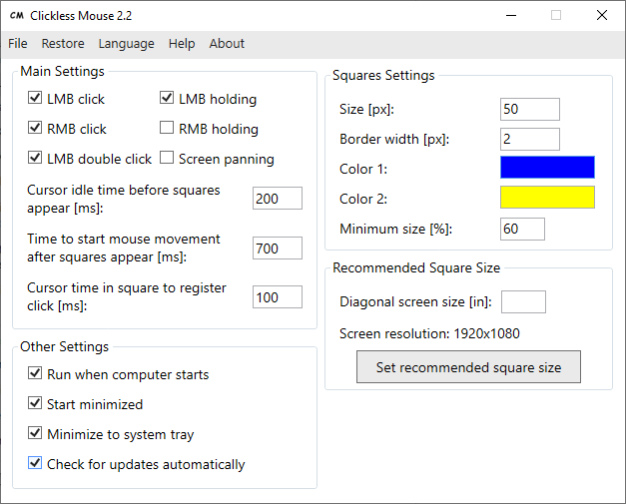
Clickless Mouse makes using a computer easier for people with repetitive strain injury, carpal tunnel syndrome, some motor disabilities and other health problems.
This application allows using a mouse without clicking - by moving it only.
By reacting to user mouse movements this program simulates left/right mouse button click, double left mouse button click and left/right mouse button holding.
Clickless Mouse can be used with a virtual keyboard to type by moving a mouse (e.g. Free Virtual Keyboard).
By using Clickless Mouse with a virtual keyboard a user can fully control a computer by moving a mouse.
When you want to click/hold a mouse button: stop moving the mouse, wait for the squares to appear and move the mouse cursor to the chosen square:
- Top center square = double left mouse button click
- Top left square = left mouse button click
- Top right square = right mouse button click
- Left square = left mouse button holding on/off
- Right square = right mouse button holding on/off
When the mouse cursor is located inside a square long enough (depending on cursor time in square to register click setting), it automatically moves back to the previous position to simulate an action based on the square that was previously entered.
If the mouse cursor is too close to the top edge of the screen, squares for LMB click, RMB click and LMB double click are shown below the mouse cursor.
If the mouse cursor is too close to the left/right edge of the screen all squares size decrease so at least 25% of a square is visible. By default decreased square size cannot be lower than 60% of the normal size. Squares size don't decrease if the mouse cursor is so close to the edge of the screen that smallest size isn't enough to show a square.
The squares that aren't needed can be disabled.
About Clickless Mouse
This program is available in English, Polish. It was last updated on 29 September, 2026. Clickless Mouse is compatible with the following operating systems: Windows.
The company that develops Clickless Mouse is Mikołaj Magowski. The latest version released by its developer is 2.2. This version was rated by 1 users of our site and has an average rating of 5.0.
The download we have available for Clickless Mouse has a file size of 1.0 MB. Just click the green Download button above to start the downloading process. The program is listed on our website since 2024-01-28 and was downloaded 33 times. We have already checked if the download link is safe, however for your own protection we recommend that you scan the downloaded software with your antivirus. Your antivirus may detect the Clickless Mouse as malware if the download link is broken.
How to install Clickless Mouse on your Windows device:
- Click on the Download button on our website. This will start the download from the website of the developer.
- Once the Clickless Mouse is downloaded click on it to start the setup process (assuming you are on a desktop computer).
- When the installation is finished you should be able to see and run the program.
Program Details
System requirements
Download information
Pricing
Version History
version 2.2
posted on 2024-01-28
- Added automatic check for updates.
- Changed recommended square size.
- Improved UI.
version 2.1
posted on 2023-12-07
- Changed: app from now on requires administrator rights to run.
- Changed: default "Cursor time in square to register a click" is now 100ms.
- Changed: improved mouse button holding and releasing.
- Other minor improvements.
